You could save up to 25% on transaction costs².
Speak with us now to see if you qualify.
Talk to sales 1-800-515-8366
Monday - Friday, 6 AM to 4 PM PT

Table of contents
Table of contents
Running a small business requires keeping a close eye on your finances. Every dollar coming in and going out tells a story about your company's health and future growth. Tracking these details can quickly become overwhelming without an organized system in place. A general ledger template provides a clear, structured way to record your transactions and prepare accurate financial statements.
This guide will walk you through everything you need to know about a general ledger, including how to set it up and fill it out. You will learn best practices and when it might be time to make the move from spreadsheets to accounting software.
Key takeaways:
Almost every business needs a general ledger to maintain accurate financial records.
Small business owners, freelancers, and independent contractors use it to track their daily financial activities.
Bookkeepers and accountants also rely on the general ledger to generate financial statements for investors, creditors, and tax authorities. Having a centralized record helps management make informed, data-driven decisions about the company’s future.
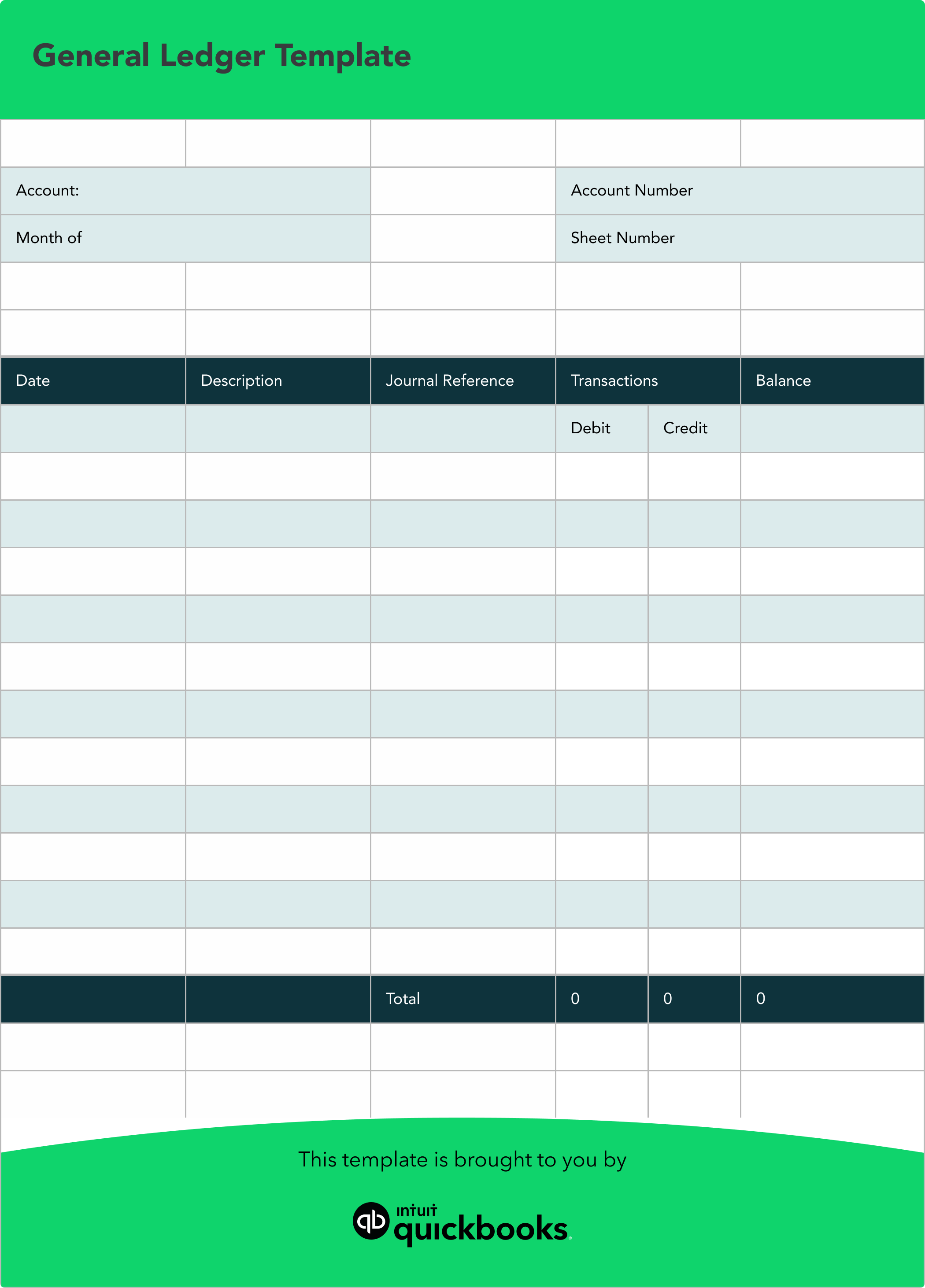
Use this sample general ledger template as a starting point for recording transactions. It shows the basic columns typically included in a ledger: date, description, journal reference, debit, credit, and running balance.
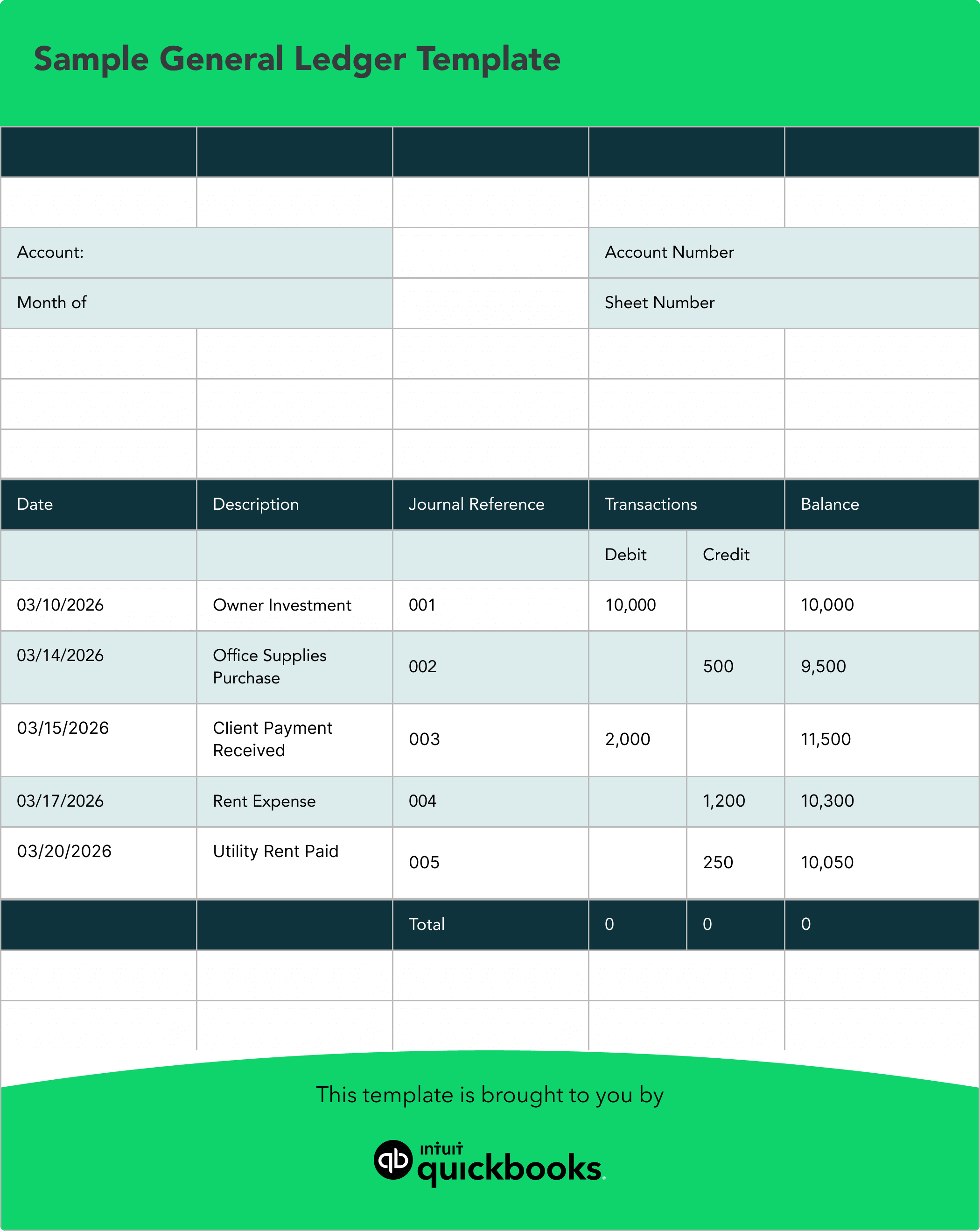
This example shows the Cash account in your general ledger with a running balance. Each entry also has an equal and opposite entry in another account (like Owner’s Equity, an expense account, or a revenue account) to keep your books in balance under double-entry accounting.
A general ledger includes several key components. Here’s a breakdown of each one and how it’s used.
The chart of accounts is a list of all the accounts used by your business, grouped into categories such as assets, liabilities, equity, revenue, and expenses. Each account, such as cash, revenue, or expenses, has its own section in the general ledger where related transactions are recorded.
Each transaction recorded in the ledger must include the date it occurred. This helps you track when money enters or leaves your accounts.
A brief explanation of the transaction, such as “Office Supplies Purchase” or “Client Payment Received,” allows for quick identification of each entry.
This unique number links your ledger entry to the original source document or journal entry, making it easy to trace transactions during audits or reviews.
Every general ledger entry will record an amount in either the debit or credit column, following the double-entry accounting system. Debits increase asset or expense accounts, while credits increase liability, equity, or revenue accounts.
The running balance shows the cumulative total after each transaction is recorded, helping you see the impact of every entry on your account’s overall status.
Once you understand the basics, creating and maintaining a general ledger is fairly straightforward. Staying consistent helps keep your records accurate and balanced.
Start by creating your chart of accounts. This includes categories like assets, liabilities, equity, revenue, and expenses. Assign a name and, if needed, a number to each account so you can organize and reference transactions easily.
Create the structure of your ledger. Each account should include columns for the date, description, reference, debit, credit, and running balance. This ensures every transaction is recorded clearly and consistently.
As transactions occur, record them in the appropriate accounts. Enter the date, add a brief description, and record the amount as a debit or credit. Each transaction should have a corresponding entry in another account to keep your books balanced.
At the end of a reporting period, review your ledger for accuracy. Add up the balances of all accounts and prepare a trial balance. Total debits and credits should match, confirming that your records are in balance.
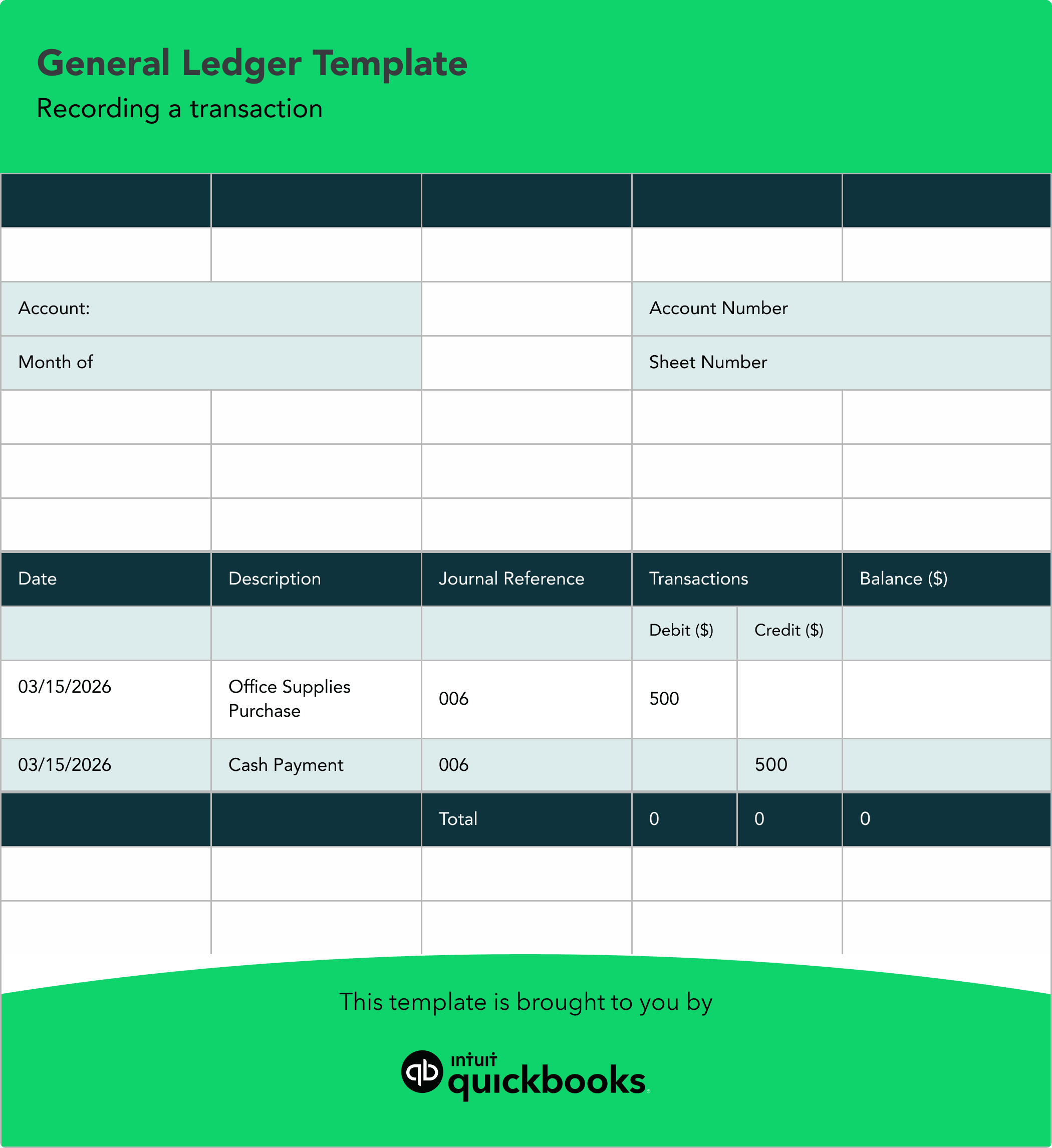
To see how this works, imagine you purchase $500 worth of office supplies using cash. You would record a $500 debit in your Office Supplies expense account and a $500 credit in your Cash account. This keeps your accounts balanced and reflects the transaction correctly.
General ledgers follow the same core principles across all businesses—recording debits and credits, organizing financial activity, and maintaining accurate records. What changes is how those principles show up day to day, depending on your business model.
Retail businesses tend to have more activity tied to inventory and sales. Their general ledger often includes frequent entries related to purchasing products, managing inventory levels, and recording daily sales.
You’ll typically see accounts like inventory, cost of goods sold, and sales revenue used regularly. This setup helps track product movement and measure profitability on each sale.
Service-based businesses, like consulting firms, focus less on physical products and more on time and expertise. Their general ledger usually centers around accounts receivable, payroll, and professional fees.
Instead of inventory, they track billable hours, client invoices, and payments. This helps them monitor cash flow and understand how revenue is generated across different clients or projects.
Freelancers and independent contractors often have a simpler general ledger. It typically focuses on incoming client payments and everyday business expenses.
Common entries include income from projects, software subscriptions, internet costs, and home office expenses. Even with fewer transactions, maintaining accurate records is still important for tracking income and managing taxes.
Even with a solid template, small errors can throw off your books and create issues later. Watch for these common mistakes:
Missing even small expenses or fees can lead to incomplete records. Over time, those gaps can distort your financial picture and make balances less reliable.
Combining personal and business transactions makes it harder to understand true business performance. It can also complicate reporting and tax preparation.
Without regular reconciliation, discrepancies can go unnoticed. Errors, missing transactions, or duplicate entries can build up and affect accuracy.
Simple data entry mistakes, like reversing numbers, can throw off your books and create imbalances that take time to track down.
To keep your general ledger accurate and easier to manage, consider these best practices.
Make it a habit to record every transaction, including small expenses and fees. Even minor omissions can add up and affect your financial totals. Keeping your records complete ensures your reports reflect what’s actually happening in your business.
Open a dedicated business bank account and credit card to avoid mixing transactions. This makes it easier to track business performance and keeps your records cleaner when it’s time to review or report on your finances.
Compare your general ledger to your bank and credit card statements on a regular schedule. This helps you catch discrepancies early, before they turn into larger issues that take more time to resolve.
Take a moment to check your entries for accuracy, especially amounts and account categories. Catching small errors early can prevent time-consuming fixes later and helps keep your financial data reliable.
A spreadsheet template offers a great starting point for new businesses with low transaction volumes. However, as your business grows, manual data entry becomes time-consuming and prone to human error. Upgrading to accounting software becomes necessary when your financial operations grow more complex.
In fact, Intuit QuickBooks research from the 2026 report, *The 3-point playbook for scale*, shows that high-growth businesses are more likely to use automated financial management systems, such as accounting software.
Here are a few signs that it's time to move on from a manual template:
Manually entering every receipt and invoice takes valuable time away from running your business. Software can automate these entries by syncing directly with your business bank accounts and credit cards.
Templates require you to calculate totals manually to see your profit margins or cash flow. Accounting platforms generate these reports instantly, giving you immediate insight into your company's financial health.
As your team grows, you may need to give an accountant, bookkeeper, or business partner access to your financial records. Securely sharing a spreadsheet can be difficult, while accounting software allows you to grant specific permissions with confidence.
If you’re ready to move beyond spreadsheets, QuickBooks offers a more efficient way to manage your general ledger and overall bookkeeping.
Connect your bank and credit card accounts to bring transactions into QuickBooks automatically. This reduces manual entry and helps keep your records current.
Use built-in rules and AI-assisted suggestions to assign transactions to the right accounts. This helps maintain consistency and keeps your ledger organized.
Attach receipts to transactions as they come in. This makes it easier to track documentation and stay prepared for reviews or audits.
View your balances, cash flow, and account activity in one place. Having everything centralized helps you understand how your business is performing.
Create financial statements and custom reports with just a few clicks. This gives you access to the information you need without extra work.
These tools help reduce manual effort, improve accuracy, and keep your books up to date. As your business grows, QuickBooks can scale with you and support more complex needs.
A general ledger template is a structured document for recording financial transactions. It helps track assets, liabilities, equity, revenue, and expenses in one place and supports financial reporting.
Most templates include columns for date, description, reference, debits, credits, and a running balance for each account.
Set up your accounts, record each transaction with the correct debit or credit, and update the running balance while keeping entries balanced.
It organizes transactions into assets, liabilities, equity, revenue, and expenses, using separate debit and credit columns for each account.
Yes. Accounting templates in Excel or Google Sheets can be easy to use and can calculate balances automatically. As your business grows, you may find it helpful to switch to accounting software for added automation and scalability.
Update it regularly, ideally weekly. Reconcile it monthly by comparing it to bank and credit card statements.
Switch when manual tracking becomes time-consuming or transaction volume increases. Accounting software helps automate tasks and improve accuracy.

Call Sales: 1-800-285-4854